Distortion & control
- Four bands with per-band Drive and Level
- Five global distortion curves with transfer icons
- Draggable Edge, Drive and Level controls on the spectrum
- Band solo, global Wet/Dry and input/output gain
Free multiband distortion for drums, bass, synths, guitars and other audio. Four bands, five global curves and a wet/dry mix. VST3 for macOS and Windows, currently in beta.
Beta downloads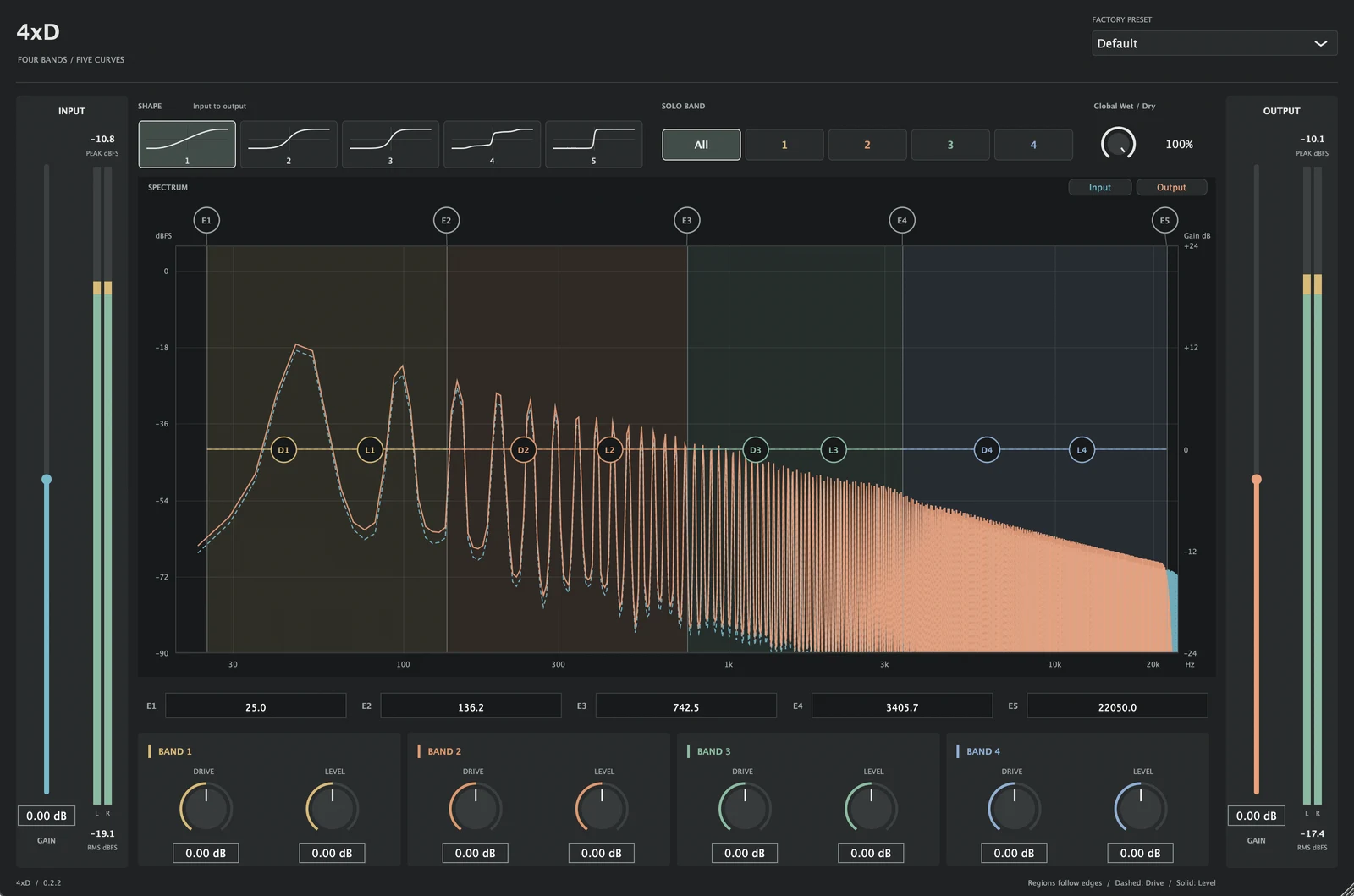
4xD is a free four-band distortion VST3 plugin for macOS and Windows. It runs inside your DAW.
Shape each band with Drive and Level, then blend the result with the original signal.
Download 4xD 0.2.2 beta for Apple Silicon Macs or Windows x64.
0.2.2 Beta · Apple silicon M1+ · macOS 13+
.pkg · approx. 3.7 MB
0.2.2 Beta · Windows 10/11 x64
.exe · approx. 4.7 MB
Version 0.2.2 beta · Released 20 October 2026. VST3 host required; no standalone app. No Intel Mac, native Windows ARM, AU or AAX build. No signup required.
Changes, fixes, known issues and downloads for each version.
4xD runs as a VST3 effect in your DAW. This beta is not yet fully verified in hosts; hands-on testing in Bitwig, Live and Cubase is ongoing.
Mac: Apple silicon (M1 or later), macOS 13 or later, and a VST3-compatible host. Windows: Windows 10 or 11 x64 and an x64 DAW with VST3 support.
There is no standalone app, Intel Mac build, native Windows ARM build, AU or AAX version.
Close your DAW. Open the .pkg installer and follow its prompts. Restart your DAW and rescan plugins if needed, then find 4xD among your VST3 effects.
Plugin location: /Library/Audio/Plug-Ins/VST3/4xD.vst3
This beta is unsigned and not notarized. macOS cannot verify it is free of malware. Only proceed if you trust the source and are confident the download has not been tampered with. After an opening attempt, Apple describes an app-specific Open Anyway option in System Settings → Privacy & Security. Do not override a warning that the software is harmful or damaged, or disable system security protections.
Close your DAW. Run the .exe installer, review the administrator prompt and follow the installer. Restart your DAW and rescan plugins if needed, then find 4xD among your VST3 effects.
Plugin location: C:\Program Files\Common Files\VST3\4xD.vst3
This beta is unsigned. Windows may show an unknown-publisher or SmartScreen warning. Only proceed after verifying and trusting the download source. Device or organisation policy may prevent installation; do not disable security protections to bypass a block.
4xD is closed-source freeware for personal and commercial audio use. Unmodified installers or complete bundles may be shared free of charge with the licence and third-party notices intact. This is a summary; the full terms are in the licence included with the installers.
No. The image above is a static interface design preview. Realtime spectra and audio processing run inside the plugin, not on this website.
Use the feedback form. Include your OS and processor, DAW and plugin versions, sample rate, buffer size, preset and steps to reproduce the issue when reporting a bug.
Include your plugin version, operating system, processor and DAW. Sample rate, buffer size and preset help reproduce audio issues.